MIDI parsing thru JavaScript in Max
Context
This project originally started as a Max program for visualizing MIDI notes. This program maps the basic information of MIDI notes—such as pitch, intensity, duration, etc.—to corresponding parameters of certain shapes, which are then drawn on Max's built-in LCD canvas. This creates a visual effect that synchronizes with the music. The pitch corresponds to the starting position of the shapes, with higher notes appearing at a higher vertical point; the duration maps to the width of the shapes, with longer notes appearing broader horizontally; subtle differences in intensity are reflected in the height of the shapes, making stronger notes display as more stretched vertically. The visualization approach is quite intuitive, presenting the intangible nature of music as easily understandable images.
The significance of music visualization is self-evident, and the methods for visualization are endless. Different requirements and aesthetics can lead to entirely different standards. This project focuses on the interpretation of MIDI information, with visualization serving primarily as an intuitive auxiliary tool. The challenge lies in how to obtain MIDI information over the entire timeline, including the duration of each note and when they occur. Only by acquiring this precise information can we achieve accurate visualizations that correspond directly to the music.
Defects of the Visualization project (Ver.1)
One of the main characteristics of Max is that it does not provide a timeline; however, it offers rich tools for obtaining and calculating time.
During the programming process, I became aware of the limitations of Max in MIDI parsing and also discovered some bugs. The original method for obtaining timing relied on a "clumsy" approach. While a multi-voice MIDI file (Format 1) can be played and output specific note information in Max, it cannot separately parse independent information for each track. As a result, when designing the original project, I manually split several parts, which clearly disrupted the data structure of the file and lost lots of information, especially in the file header. Additionally, the built-in object [midiparse] in Max loses a significant amount of "note-on" information during the parsing process. Therefore, although the project has taken shape and can effectively visualize a segment of music, it remains suboptimal, and did not yield much benefits for a better understanding of MIDI data structure.
Based on this project, I rethought the method of MIDI parsing. While there are many existing libraries in Python for handling MIDI files, the focus of this project is to deeply understand the MIDI data structure and establish a solid foundation for handling of MIDI events in future developments, rather than simply finding an hand-on tool to read the information. Max/MSP, as a graphical programming platform, can present information intuitively, which greatly aids comprehension.
Utilizing JSON to Assist in Understanding MIDI File Data Structure
Before addressing the question of "how to parse MIDI," it's essential to clarify "what MIDI data looks like." Among various methods for interpreting MIDI files, I opted for the JSON text format due to its user-friendly and readable dictionary data layout, which is well-suited for current needs.
MIDI files utilize a specific structure to store musical information, with the most basic data structure referred to as "chunks." The entire file is divided into multiple chunks, each containing specific types of data. The outer structure consists of the Header Chunk and Track Chunks:
header and track
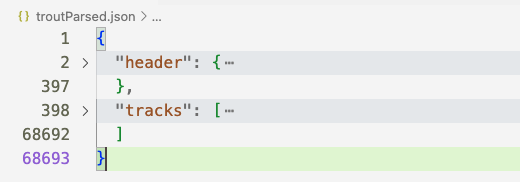
The header is always located at the beginning and contains necessary global information (metadata), such as the number of tracks, tempo, and time format.
header content
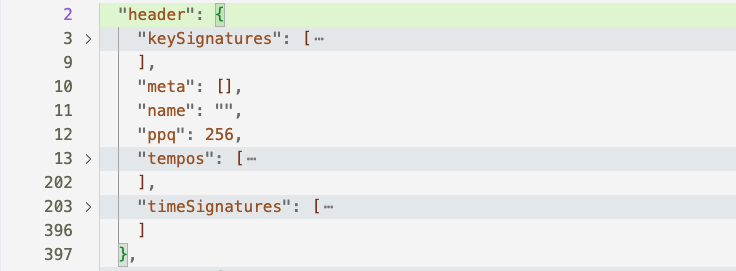
Track chunks are the most content-rich sections, where the value for "tracks" is a list representing the number of parsed tracks, with each track corresponding to a different voice or independent melody line. In chamber music, for instance, each voice typically represents an instrument. Each track chunk further divides into multiple "events." The MIDI format essentially consists of a series of instruction directives, known as MIDI events, detailing which notes to play, the intensity of the playing, and the instruments used.
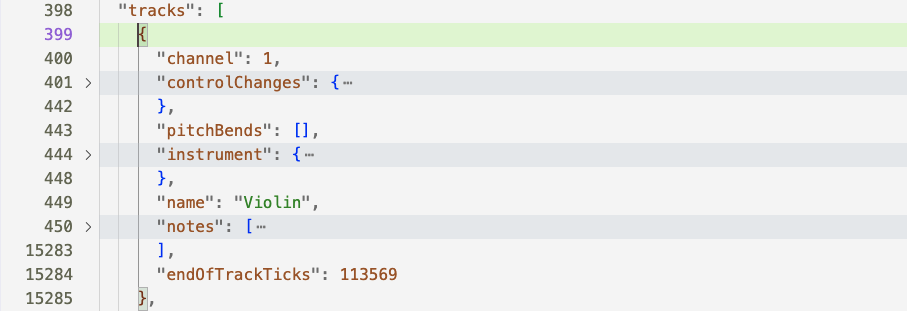
The most numerous entities present in the output are notes, containing specific information for each note (event data).
BPM (Beats Per Minute) represents the basic unit of speed in music but does not include absolute timing. In MIDI, a fundamental concept is "delta time", with unit of ticks. A crucial piece of information in the header chunk is ppq (Pulses Per Quarter note), which indicates the number of pulses per quarter note and thus serves as the MIDI file's temporal resolution. In the sample file, the time resolution is 256, meaning there are 256 ticks for each quarter note. A higher ppq indicates better temporal resolution, allowing for more precise control. By combining ppq with BPM, one can calculate absolute time.
Example: The First Two Notes (A and D) of the "Trout" Theme
A breakdown of the relevant parts from the JSON structure:
"notes": [
        {
          "duration": 0.48046875,
          "durationTicks": 123,
          "midi": 69,
          "name": "A4",
          "ticks": 0,
          "time": 0,
          "velocity": 0.5984251968503937
        },
        {
          "duration": 0.37109375,
          "durationTicks": 95,
          "midi": 74,
          "name": "D5",
          "ticks": 128,
          "time": 0.5,
          "velocity": 0.7322834645669292
        },
......
Note Duration: The duration of the first note A is 123 ticks, and a quarter note is 256 ticks. Therefore, the relative length of this note is $ \frac{123}{256} = 0.48046875 $ quarter notes.
Note Name: The pitch of the note corresponds to MIDI pitch values 69 and 74, which represent A4 and D5.
Start Time: The start time in ticks denotes that the start position of the first note is naturally zero, while the second note starts at 128 ticks. Given that ppq is 256, the relative time point corresponds to the position of 0.5 quarter note durations. However, this is still not absolute time; the bpm of this MIDI file is 60. The absolute time can be calculated using the following formula:
$$ \text{abs time (in milliseconds)} = \frac{60000}{\text{bpm}} \times \text{relative time} $$
By substituting the bpm and relative time into the formula, we can obtain the absolute time point, and the same logic applies to note duration. The actual starting position of the second note is thus 500 milliseconds. Quarter notes serve as the basic measure of musical beats, which is why "relative time" is used.
Velocity: The value of the velocity attribute is typically in the range of 1–128 or 0–127 across most platforms.
Development of MIDI Parsing Script for Max
After understanding the data structure and clarifying the specific requirements (time retrieval in this project), suitable development methods can be chosen.
Max provides a convenient built-in object [js] for directly running JavaScript files, but for more complex needs, especially when third-party JS libraries are required, [node.script] is a better choice. Node is a JavaScript framework used for writing programs and serves as an extension for implementing complex tasks that Max cannot handle. It is also a powerful tool. Although both objects point to a JS source file, in terms of execution, [node.script] and [js] are fundamentally different. When using [js], the script runs within the Max software, while [node.script] runs a separate Node.js process. This brings significant benefits, including parallelization and improved overall performance. [node.script] functions as a complete application; once started, it has its own execution flow. Since Node.js and Max run in independent processes, messages sent to the Node.js script are executed asynchronously. Using [node.script] allows access to the complete Node.js environment. For example, many mature MIDI parsing libraries are essential considerations for this project, leading to the final choice of using the [node.script] object.
Among various third-party JS libraries for parsing MIDI data, the decision was made to use midi-file, known for its professionalism in handling MIDI data, with concise and lightweight code that is also easy for beginners to use.
The most important function is readMidi(), which is the core of the entire code base. readMidi() is designed to parse MIDI files and extract the needed information, including: bpm, total duration in ticks (finalTicks), pulses per quarter note (ppq), number of tracks (numOfTracks), and other global information. It then traverses each track's note events through two nested forEach loops.
Overall Logic of readMidi()
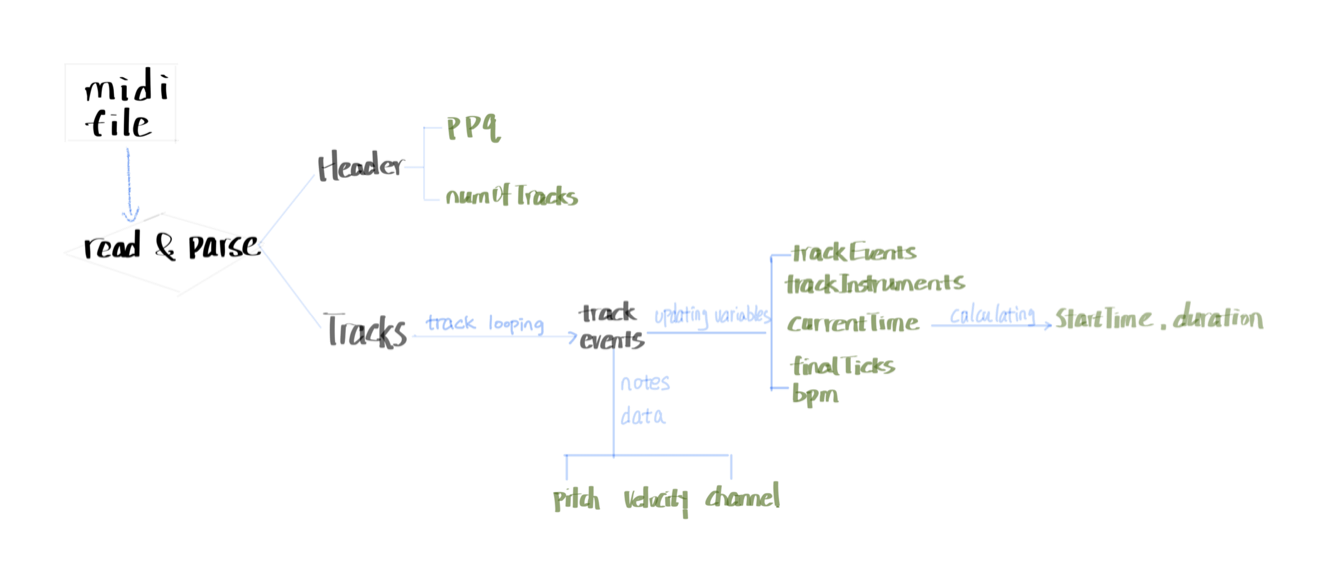
The readMidi function parses the MIDI file and processes events in each track:
- Header Chunk: Extract global information.
- Tracks Chunk: Iterate each track:
- Initialize current time, establish variables for active notes and track events.
- Iterate through each event in the track:
- Retrieve program change information.
- Retrieve tempo information and calculate bpm.
- Note-on event:
- Create a unique key for the note (track index, channel, and note number); store pitch, velocity, start time, and channel information in the
activeNotesobject (in dictionary form).
- Create a unique key for the note (track index, channel, and note number); store pitch, velocity, start time, and channel information in the
- Note-off event (or note-on with velocity 0):
- Use the key to retrieve corresponding note information from
activeNotes; calculate note duration; - Create a
noteEventobject (containing complete note information) and add it to the current track'strackEvents; - Remove the traversed note from
activeNotes.
- Use the key to retrieve corresponding note information from
- Output:
- 'note' identifier
- Track number
- Instrument name
- Pitch
- Velocity
- Note start time
- Note duration
- Channel
Core Function Code
// read and parse the input MIDI file
function readMidi(filePath) {
    try {
        Max.post(`Attempting to read MIDI file: ${filePath}`);

        const input = fs.readFileSync(filePath);
        Max.post('MIDI file read successfully.');

        const parsed = MidiFile.parseMidi(input);
        Max.post('MIDI file parsed successfully.');

        // Header Chunck: time resolution & tracks number
        const ppq = parsed.header.ticksPerBeat;
        const numOfTracks = parsed.header.numTracks;

        // Tracks Chunck:
        const trackEvents = {};       // events for each track
        const trackInstruments = {};  // program changes for each track

        let finalTicks = 0;           // initilize track end
        let bpm = null;

        parsed.tracks.forEach((track, trackIndex) => {
            trackEvents[trackIndex] = [];
            trackInstruments[trackIndex] = {};
            let currentTime = 0;
            const activeNotes = {};

            track.forEach(event => {
                currentTime += event.deltaTime;

                if (event.type === 'programChange') {
                    trackInstruments[trackIndex][event.channel] = event.programNumber;
                }                                                // program change

                if (event.type === 'setTempo' && bpm === null) {
                    bpm = tempoToBpm(event.microsecondsPerBeat);    // 60M/mic_per_4n
                }

                if (event.type === 'noteOn') {
                    const noteKey = `${trackIndex}-${event.channel}-${event.noteNumber}`;
                    activeNotes[noteKey] = {
                        track: trackIndex,
                        type: 'noteOn',
                        pitch: event.noteNumber,
                        velocity: event.velocity,
                        startTime: currentTime,
                        channel: event.channel,
                    };
                } else if ((event.type === 'noteOff' || (event.type === 'noteOn' && event.velocity === 0))) {
                    const noteKey = `${trackIndex}-${event.channel}-${event.noteNumber}`;

                    if (activeNotes[noteKey]) {                    // if the active note exists
                        const noteOn = activeNotes[noteKey];
                        const duration = currentTime - noteOn.startTime;
                        trackEvents[trackIndex].push({       // append note info after note-off
                            track: trackIndex,
                            type: 'noteEvent',
                            pitch: noteOn.pitch,                 // retrieves corresponding note-on info
                            velocity: noteOn.velocity,
                            startTime: noteOn.startTime,
                            duration: duration,
                            channel: noteOn.channel,
                        });
                        delete activeNotes[noteKey];
                    }
                }
            });

            finalTicks = Math.max(finalTicks, currentTime);   // calcu endTick after a track's been looped
        });
Patch Design
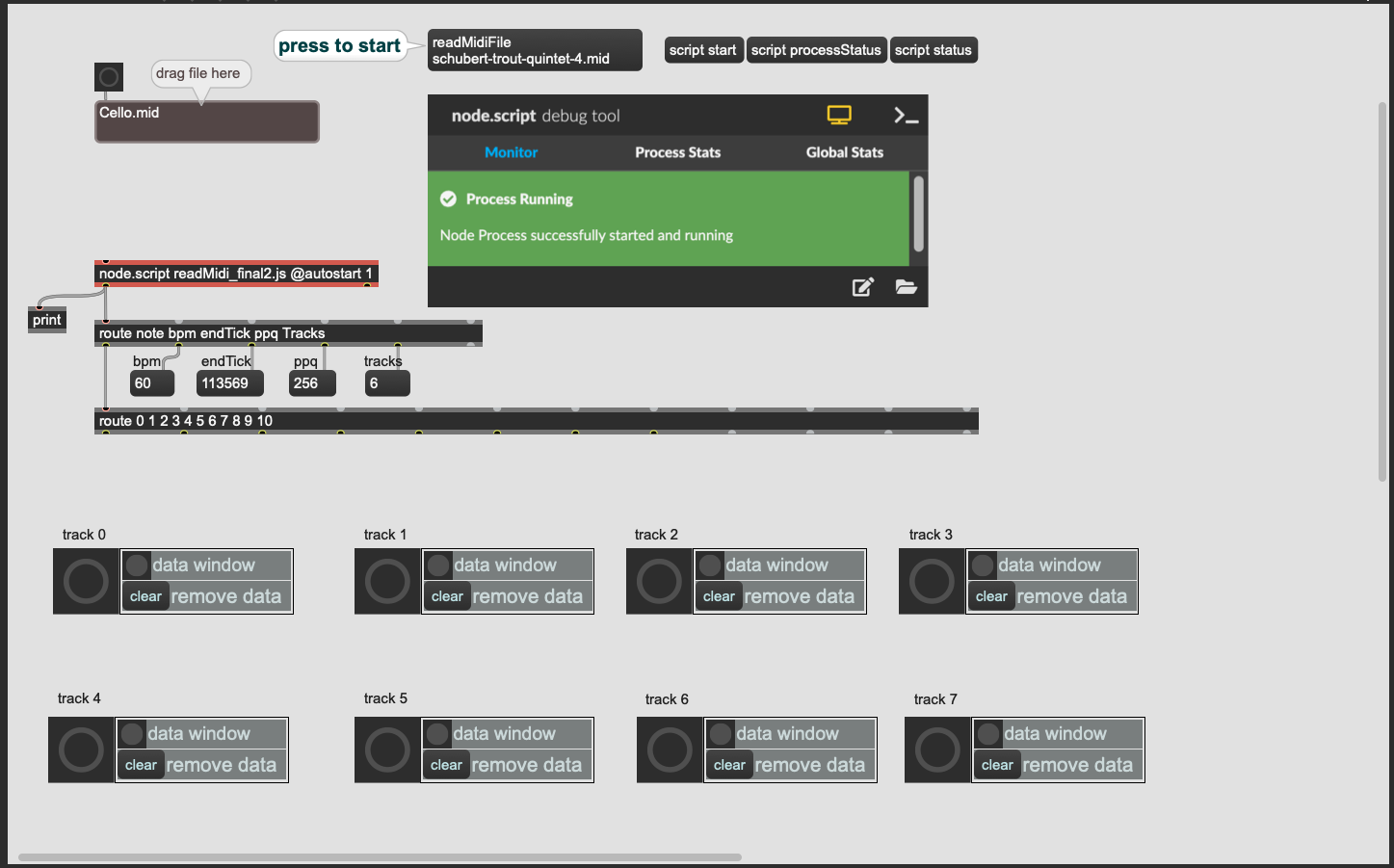
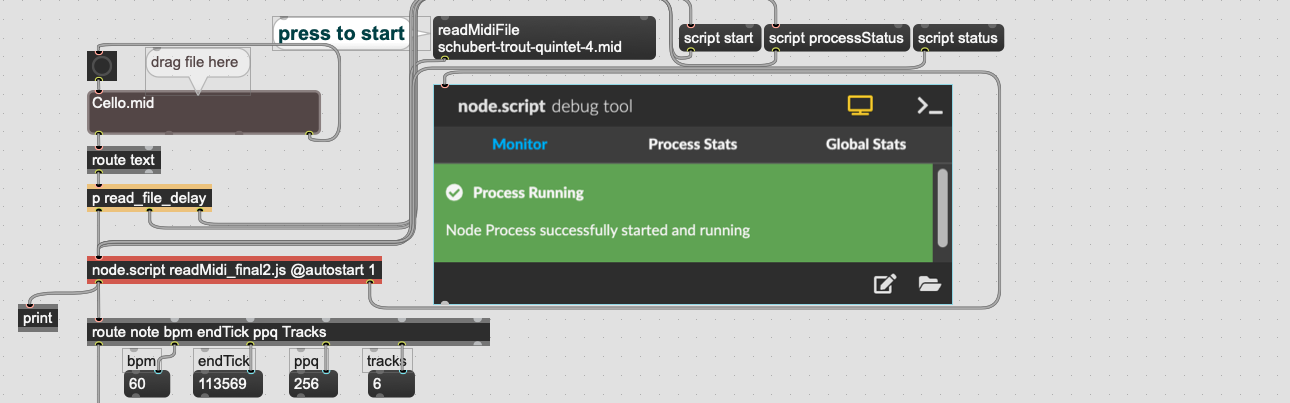
As an object with independent running process, the [node.script]'s parameter -- JS file pointer is a must. The 'max-api' provides a convenient connection with Node, where the Max.outlet() function acts as the output port in the Max object. Messages sent outside of [node.script] are specified through the Max.addHandler() function. The code at the end of the script:
Max.addHandler('readMidiFile', (filePath) => {
        readMidi(filePath);
    });
adds a command 'readMidiFile' to control Node files. In the command connected to Node's input port, in addition to built-in fixed commands, custom content can be defined as needed. Based on the requirements of this project, 'readMidiFile' invokes the core readMidi() function.
Using the [node.script] object has an additional advantage: Max provides a convenient monitoring object, [node.debug], represented visually by the "node.script debug tool", displaying file reading status and error messages.
The file dragging section is an additional module that facilitates file inputting. Here, a delay [p read_file_delay] is applied between file reading and the debug tool trigger. According to the data flow order in Max, which is right-side first, it leads to file status monitoring happening before the file is read, resulting in error messages. Therefore, a delayed [bang] is used to handle this.
After reading the MIDI file, a large amount of MIDI information can be seen in the console:
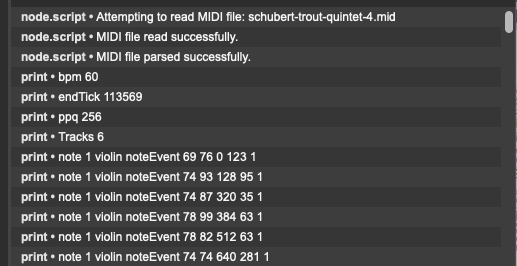
These outputs are the data needed for future visualization or any other design requiring MIDI information. To use this data, it must be stored.
Similar to the time processing module in the first version of the project, [coll] is used to store data. Each track corresponds to a set of data storage, with one [coll] object per track. Theoretically, it can support unlimited numbers of tracks by adding track numbers in [route], increasing new data record modules, and sending data. As a custom tool, it can be modified easily as needed. For brevity, only eight modules are listed as examples.
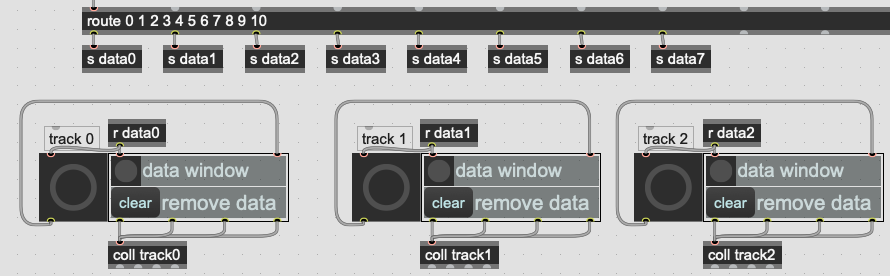
The data output from [node.script] goes through two layers of routing. First, some global information (bpm, endTick, ppq, tracks) is filtered separately, followed by note information routed by track number, and sent to the corresponding record module. Each [coll] is directly named based on track + index, ensuring clarity, also preventing redundancy.
In the main patch, the data storage module is presented by [bpatcher], which loads another separate Max file;
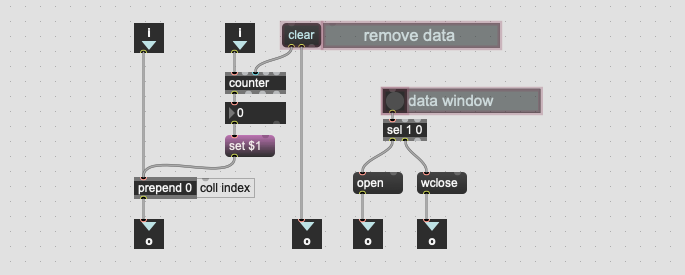
Similarly to the original project, each data entry is indexed using a [counter], which is determined by the properties of [coll]. The user interface (presentation mode) keeps only two buttons for clearing data and toggling the [coll] window. In the main patch, incoming data received wirelessly from [route] will simultaneously trigger a prominent [bang], which serves not only as a visual cue but also to trigger the [counter].
After reading a multiple-track MIDI, the bangs representing each track can be seen flashing quickly in succession. In reality, they do not flash just once; the rapid transmission of data can result in thousands of flashes occurring in a split second. The script processes each track sequentially. From the Max Console, it can also be observed that the data is outputted sequentially by track.
Using JSON to Verify Script Accuracy
After the script was completed, a verification was implemented, utilizing a JSON file generated by Tone.js. Global information, such as ppq and ending time, is easy to cross-reference, but directly checking the number of notes in a given track or finding specific notes through JSON is impractical. Consequently, a simple Python file was created to read the JSON for verification purposes.
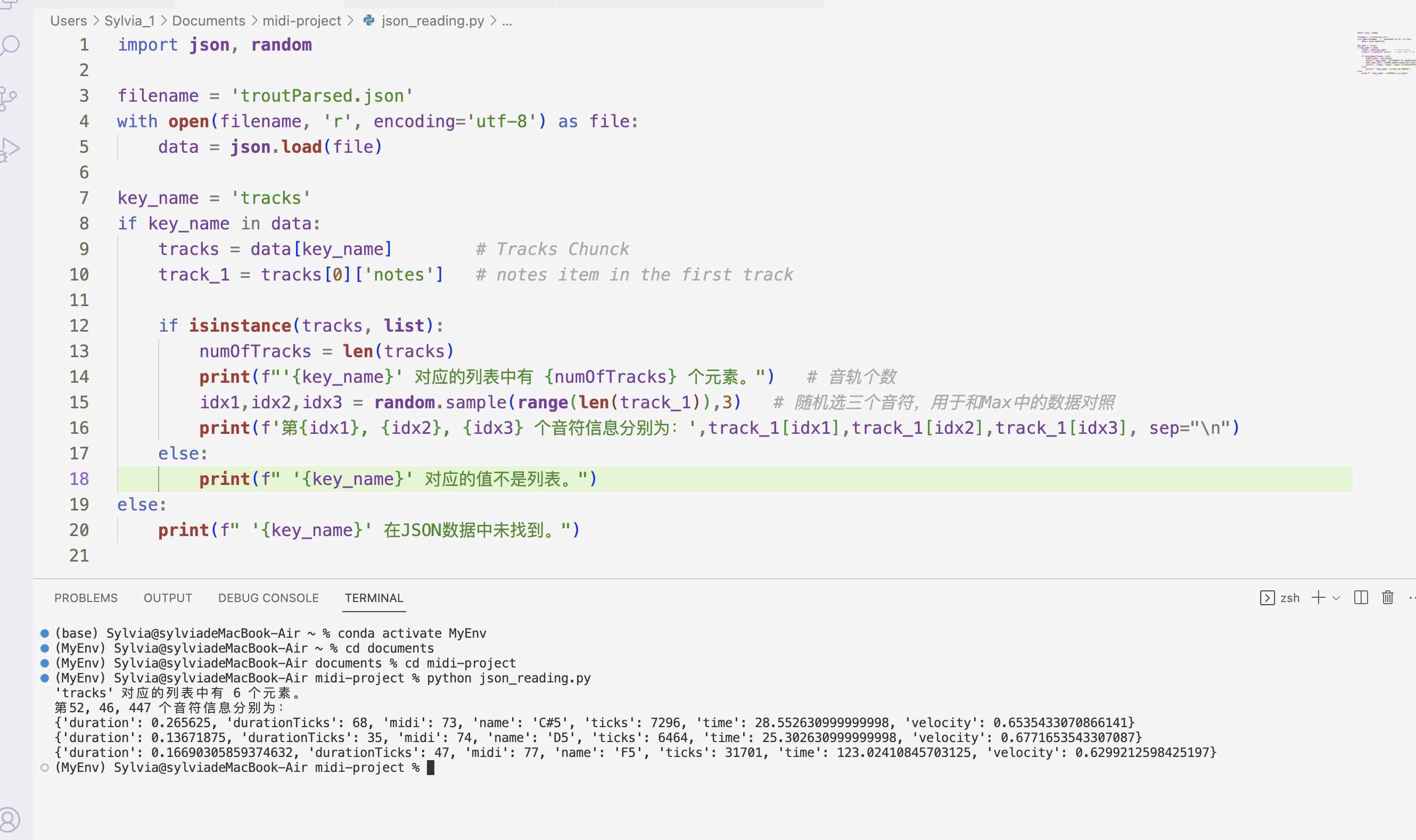
Using the example of the Trout Quintet, after retrieving the JSON data, three random notes were retrieved to display their information, which was then compared back to the data in [coll] within Max. After multiple rounds of checks, the noted information was confirmed to match perfectly.
Here we are, the MIDI parsing program is successfully completed.
Summary
In simple terms, this version completely overhauls the "Timing data processing" module from the original project, redesigning a professional and accurate MIDI parsing program. The initial version could not decompose a full MIDI file; note information had to be input as the MIDI file played at original speed while waiting for each note to be recorded. Additionally, the original project encountered numerous bugs in Max's built-in objects during MIDI parsing, leading to lost note events.
This version, utilizing Node.js and a JS script, accurately parses a complete MIDI file. Theoretically, it can support any number of parts in MIDI (format 1), and parsing occurs instantaneously, allowing rapid re-reading. So you don't need to worry even if data is inadvertently deleted. As a parsing tool, it provides sufficient data, while further processing depends on what is needed with this data and can be handled accordingly.
Through this project, multiple programming platforms, languages, and data formats were effectively utilized, alongside a deeper understanding of the MIDI file data structure, establishing a solid foundation for future operations and developments related to MIDI.